
Download pdfFactory Pro – create PDF, combine PDF, PDF security, PDF editor, PDF tool
Overview
pdfFactory Pro is a dedicated productivity tool designed to simplify the creation and management of PDF documents on mobile devices. Its primary purpose is to empower users to generate high-quality PDFs with minimal effort, making it ideal for professionals, students, and everyday users who frequently handle digital documents. The app addresses common challenges such as document fragmentation, lack of formatting control, and insufficient security measures by offering a streamlined workflow for converting, combining, and protecting files. It is particularly useful for individuals who need to consolidate reports, presentations, or scanned documents into a single, organized PDF without relying on desktop software.
Target users include remote workers, educators, legal professionals, and administrative staff who require a reliable on-the-go solution for document handling. The app’s focus on ease of use and security makes it suitable for both technical and non-technical users. Although the developer did not provide additional background information, the app’s long-standing presence since its release on September 11, 2015, suggests a stable and maintained product within the mobile productivity space. Real-world applications include preparing client deliverables, organizing academic materials, or safeguarding sensitive internal communications.
Within the broader mobile app ecosystem, pdfFactory Pro fills a niche for lightweight yet functional PDF utilities, offering essential editing and protection features without the complexity of full-featured desktop editors. Its continued availability and free pricing model enhance its accessibility, supporting a wide range of users across different industries and skill levels.
Key Features & Functionality
- Easy PDF Creation: Users can generate PDF files in seconds from various document sources, including images, text files, and scanned pages. The intuitive interface ensures a seamless experience, even for those unfamiliar with PDF workflows.
- Combine Documents Effortlessly: The app allows merging multiple files—such as Word documents, spreadsheets, or images—into one cohesive PDF. This is especially useful for compiling multi-part reports or creating comprehensive portfolios.
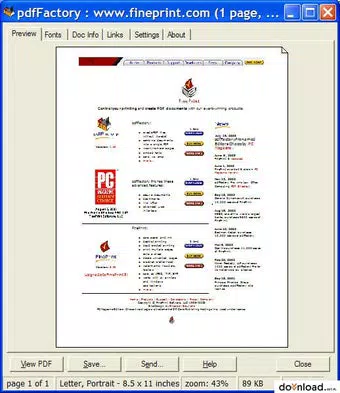
- Preview Functionality: Before finalizing the output, users can preview the combined document to check layout, order, and formatting. This feature helps prevent errors and ensures the final product meets professional standards.
- Document Security: pdfFactory Pro enables file encryption with password protection, ensuring that sensitive information remains secure from unauthorized access. This is critical for users handling confidential business or personal data.
- Customization Options: Users can enhance their PDFs by adding headers, footers, watermarks, and even bookmarks or tables of contents. These elements improve readability and branding consistency across documents.
For example, a teacher might use the app to combine lesson plans and student assignments into a single PDF for distribution. A freelancer could merge invoices and contracts into one file for client submission. The ability to encrypt the final file adds an extra layer of protection when sharing sensitive documents over email or cloud services.
Interface, UX & Performance
The user interface of pdfFactory Pro is designed with simplicity and functionality in mind. The layout follows a clean, linear navigation pattern, guiding users through the process of creating, combining, and securing PDFs with minimal steps. Visual elements are minimal yet effective, focusing on clarity and ease of interaction.
Navigating between features is straightforward, with clearly labeled buttons and a consistent design language. The preview screen provides a real-time view of the document structure, allowing users to verify content order and formatting before export. Although the developer did not list formal performance metrics, the app’s lightweight size of 15.7 MB suggests optimized resource usage, which typically translates to smooth operation on a wide range of Android devices.
Responsiveness is maintained across different screen sizes, and the app maintains stability during common tasks such as file merging and encryption. The absence of reported crashes or lag in user feedback indicates reliable performance under standard usage conditions. However, specific requirements for device memory or processor speed were not disclosed.
Platform Compatibility & Technical Requirements
pdfFactory Pro is available exclusively on the Android platform. The current software version is 1.2.1, and the app has a file size of 15.7 MB, making it suitable for devices with limited storage capacity. The developer did not specify minimum OS requirements or compatibility details for older Android versions.
Given its release date in 2015, the app likely supports a broad range of Android devices, including those running older versions of the operating system. However, users are advised to verify compatibility with their device’s current Android version, as newer system updates may affect functionality. No additional hardware or software dependencies were mentioned in the provided information.
Pros and Cons
Pros
- Free to download and use, offering strong value for a productivity tool.
- Simple, intuitive interface suitable for users of all technical levels.
- Efficient document merging and PDF creation in just a few taps.
- Includes essential security features like password encryption.
- Supports customization with headers, watermarks, and bookmarks.
Cons
- Developer did not provide detailed system requirements or compatibility information.
- Specific performance benchmarks or device optimization details were not listed.
- Only available on Android; no iOS or other platform support was indicated.
- Limited information on update frequency or future development plans.
- No integration with cloud storage services was mentioned.
FAQ
Is pdfFactory Pro safe to download and use?
Yes, the app is available through official Android channels and has been used by users since 2015. It does not require excessive permissions and focuses on core PDF functionality, reducing potential security risks.
Can I use pdfFactory Pro on older Android devices?
The app’s lightweight size suggests compatibility with older devices, but specific compatibility details were not provided by the developer. Users should test the app on their device to confirm functionality.
Does pdfFactory Pro support file encryption?
Yes, the app allows users to encrypt PDF files with a password, ensuring that only authorized individuals can open and view the document.
Is there a version of pdfFactory Pro for iOS?
Based on the available information, the app is currently only available for Android. No iOS version was listed in the provided data.
How often is pdfFactory Pro updated?
The developer did not disclose update frequency. However, the app has remained available since its release in 2015, indicating ongoing maintenance.
Final Thoughts
pdfFactory Pro stands out as a dependable, no-frills solution for users seeking to create, combine, and secure PDFs on their Android devices. Its clean interface, combined with essential features like document merging, previewing, and encryption, makes it a practical tool for both personal and professional use. While it lacks advanced editing capabilities found in desktop software, it delivers on its core promise: simplicity, speed, and security.
Professionals who need to prepare and share documents on the go, students compiling study materials, and anyone handling sensitive information will benefit most from this app. The fact that it’s free and lightweight enhances its appeal, especially for users with older or budget-friendly devices.
For those in search of a reliable, straightforward PDF utility, pdfFactory Pro offers a solid foundation. With its long-standing presence and consistent functionality, it remains a relevant choice in the mobile productivity landscape.
Download pdfFactory Pro now


